
MEDIEVAL REAL TIME STRATEGY PC and Mobile Controls
Select, peel, recruit, and load wagons without dumping the whole army.
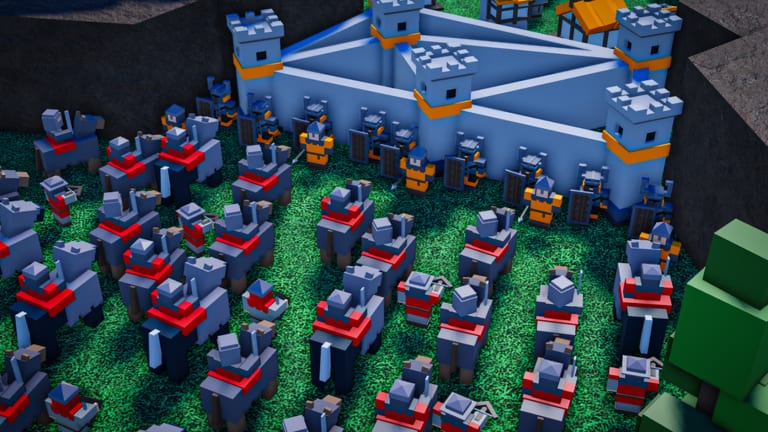
MEDIEVAL REAL TIME STRATEGY is an online multiplayer RTS on Roblox. It supports mouse-and-keyboard and mobile in the same matches. Bad controls look like bad strategy: you think Knights are weak when you actually sent half the blob to a mill because E was never pressed. This page is the input sheet. It does not replace the first-hour castle walkthrough; it is what you read when the walkthrough says right-click and your thumb is on the wrong button.
Core inputs
| Action | PC | Mobile |
|---|---|---|
| Select a unit or building | Left-click | Tap the unit or building |
| Unselect everything | E | Clear the selection with the on-screen unselect control |
| Unselect one unit from a group | Shift + left-click that unit | Deselect the single portrait or tap-off that one body |
| Recruit from the castle | Right-click (or tap) the castle, then pick Builder, Archer, Swordman, or Repairman | Tap the castle, then the same recruit list |
| Interact: load boats and War Wagons | Q | The interact button (this is Q on mobile) |
| Line troops | F, as players mention | Use the formation or line control if your HUD shows it; otherwise nudge units into a row |
Mobile does not get a secret second army. The same recruit list, the same mill jobs, and the same win condition apply. The interact button is the one players miss: without it you cannot load a War Wagon or a boat, and you will think the vehicle is broken.
This wiki does not invent extra mobile glyphs beyond that interact mapping. If a button on your HUD is unlabeled, tap the castle, a mill, and a wagon once in a low-stakes lobby and watch what highlights.
Selection hygiene
Left-click is greedy. Click a Knight in a crowd and you may only grab that Knight. Drag or chain-click if your client supports group select, then immediately prune with Shift plus left-click so a Repairman is not marching into a trebuchet volley. When the selection is poisoned - builders mixed with swordsmen, King mixed with a scout - press E and start over. E is cheaper than a dead mill line.
Keep builders mentally separate from the army. After you send them to a farm, press E, then select troops. Mixing those jobs is how a builder walks into a tower.
Recruiting without opening the wrong hut
The castle is the recruit point for Builder, Archer, Swordman, and Repairman. Barracks (about $35, 35 HP, not upgraded) later adds Knight, Longbower, Crossbower, Mage, and Wizard. Siege Workshop adds Catapult, Trebuchet, Ballista, and War Wagon. Hospital adds Medic. Right-click or tap the building that actually trains the unit. Clicking the keep will never spawn a Trebuchet.
Recruit in small packets while you still have money ticking. The castle prints about $25 per minute and mills add about $11 per minute on a farm; that is not a license to queue twenty Knights while two builders idle. The windmill income breakdown is the money page; this page only cares that you can hit the recruit list under pressure.
Q, wagons, boats, and why F shows up in chat
Q is interact. On a War Wagon it loads units. On boats it does the same job. Select the passengers first or select the vehicle and then hit interact according to what your client highlights - the consistent rule is Q on PC and the interact button on mobile. Unload before you park a wagon on a wall you intend to shoot; a loaded wagon that never deploys Medics is a coffin.
Players mention F to line troops. Use it before a castle push so Knights are a front and Crossbowers are not the first rank into splash. If F does nothing on your bind, manually stagger the blob: tanks forward, splash behind, King in aura range but not on the keep’s chip damage if you can help it. More on that shape is in macro and army compositions.
Balloons skip tower lines. Loading and steering them still uses the same select and move rules. Do not Q-load a balloon the way you load a wagon unless the interact prompt actually appears.
King, camera, and a one-match drill
The King selects like any unit. Peel him with Shift plus left-click to walk the aura onto mills without dragging Knights. Aura details sit on king aura and army roles. If the camera is lost, click your castle. Builders come from the keep menu, not from spam-clicking dirt. Private-server commands are a game pass for owners, not extra public hotkeys - press E to unselect.
Queue one online match (not a solo fantasy). For three minutes allow only two builders, mills, E after every send, Shift-peel if a swordsman sneaks into the builder pile, and swordsmen only if a Watchtower drops. Then barracks. Walls wait for wall-breaking siege notes. If Ranked is already unlocked (level 7+), do this in the right bucket - 1-5 versus 6+ - as ranked unlock and etiquette explains.
The rest of the guides overview assumes you can select, peel, recruit, and interact. Stay here until E is muscle memory.
Frequently Asked Questions
Quick answers for codes, ranked, windmills, and siege fights.
What does Q do in Medieval RTS?
Q is interact: load units into War Wagons and boats. On mobile the same action is the interact button, not a hidden chat command.
How do I recruit builders?
Right-click or tap your castle and buy Builder for about $10. The keep also offers Archer, Swordman, and Repairman. Barracks units come from a Barracks, not the keep.
How do I unselect a single Knight without dumping the army?
Shift + left-click that Knight on PC. Use E only when you want the entire selection gone.
Does mobile have a real interact control?
Yes. Q on mobile is the interact button. Use it to load wagons and boats. Other HUD labels vary; tap the castle to recruit.
Players say F lines troops. Is that required?
Players mention F for lining up. If it works on your bind, use it before a push. If not, stagger Knights forward by hand as described in macro and army compositions.
Are private-server commands part of the default control scheme?
No. They are a game pass for private-server owners. Public matches still use left-click, E, Shift-click, Q, and castle recruit.